Подача материала через электронную редакцию
Редакция научного журнала «Антропогенная трансформация природной среды» принимает научные статьи через сайт https://press.psu.ru/index.php/atps/
Алгоритм действий при подаче материалов:
1. РЕГИСТРАЦИЯ ИЛИ ВХОД В ЛИЧНЫЙ КАБИНЕТ АВТОРА
Автор регистрируется на сайте и заполняет все необходимые поля профиля в личном кабинете. Для этого нужно Войти в систему или Зарегистрироваться.
Вся переписка, в том числе уведомление автора об этапах и результатах рассмотрения статьи, производится через личный кабинет автора и по электронной почте, указанной в профиле автора.
ВНИМАНИЕ!!! Редакция Журнала обращает внимание авторов на необходимость корректного указания адреса электронной почты, своевременной актуализации своих контактных данных и другой информации, указанной в личном профиле. В случае несоответствия профиля правилам регистрации (в целом) или неверного указания контактной информации (в частности), рукопись может быть отклонена.
2. НАЧАЛО ПОДАЧИ МАТЕРИАЛОВ
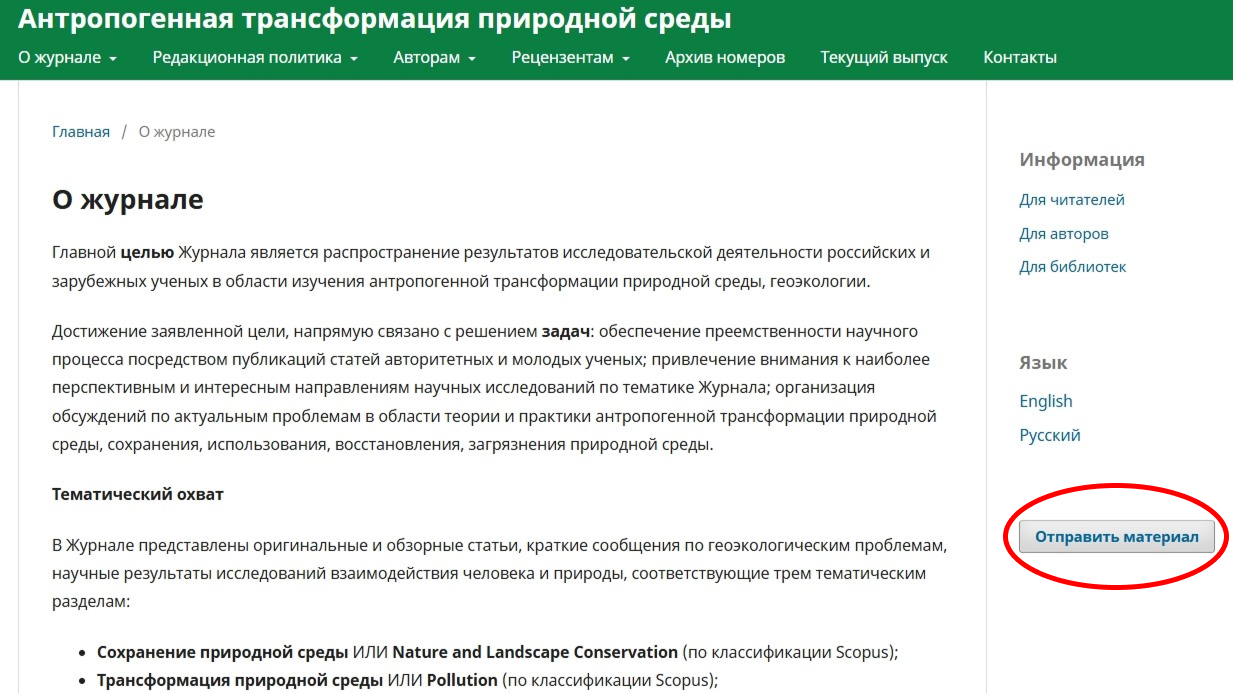
Далее необходимо войти на стартовую страницу подачи материалов. Для этого на любой странице сайта в правой части имеется большая кнопка ОТПРАВИТЬ МАТЕРИАЛ
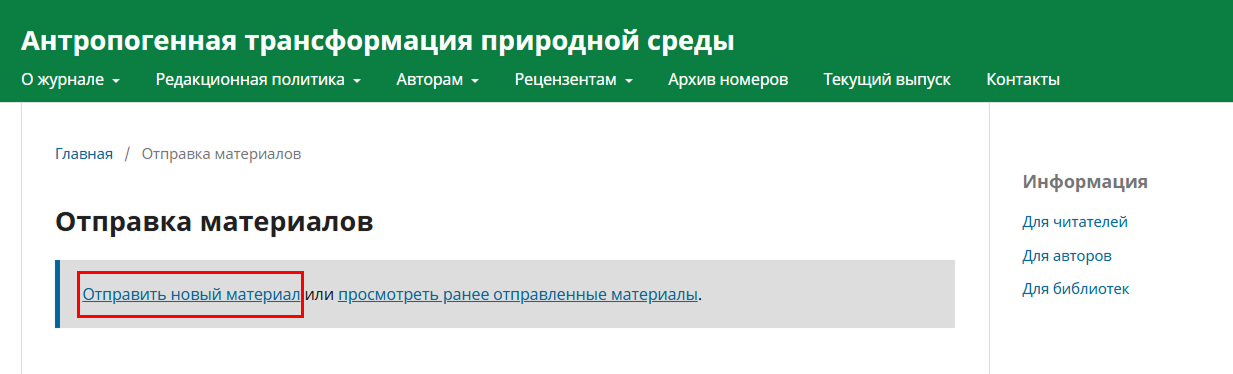
После этого необходимо нажать на ссылку ОТПРАВИТЬ НОВЫЙ МАТЕРИАЛ
В открывшемся окне необходимо:
- выбрать язык материала (русский или английский);
- написать заголовок (название материала);
- выбрать раздел Журнала, которому соответствует рукопись;
- поставить галочку о соответствии рукописи обязательным требованиям;
- дать согласие (поставить галочку) на обработку персональных данных.
После заполнения всех полей необходимо нажать кнопку Начать отправку в нижней части окна.
3. ЗАГРУЗКА МАТЕРИАЛА
Во вкладке Отправить материал необходимо:
- указать подробности о материале на русском и английском языках (заголовок, ключевые слова, аннотация);
- загрузить текст рукописи, включая титульную и основную части статьи, все таблицы и рисунки, список литературы (формат Word);
- файлы иллюстраций (диаграммы, графики, фотографии, карты) в оригинальном разрешении;
- cкан-копию Лицензионного договора (формат PDF).
Для загрузки файлов надо нажать на кнопку ДОБАВИТЬ ФАЙЛ в правой части окна.
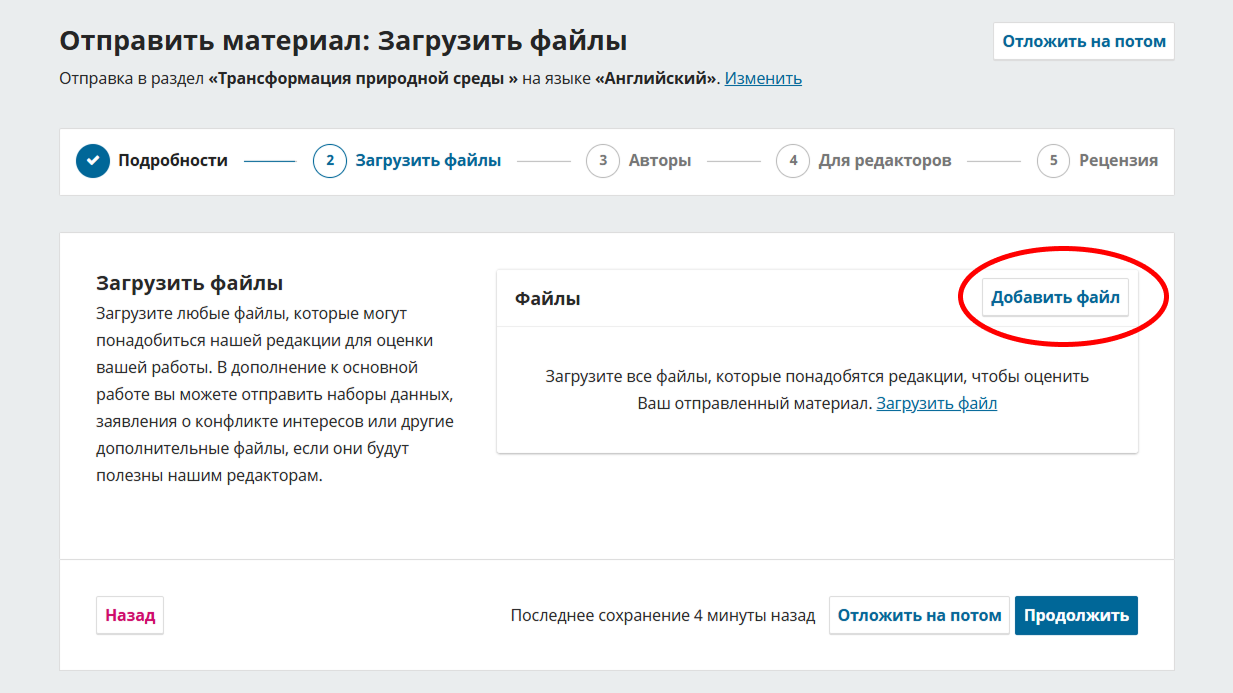
После загрузки файла автору предлагается выбор типа загруженного материала. Для каждого файла необходимо выбрать один из 9 вариантов: Текст статьи // Инструмент исследования // Материалы исследования // Результаты исследования // Транскрипты // Анализ данных // Набор данных // Исходные тексты // Другое.
ВНИМАНИЕ. Для ускорения процесса обработки материалов Редакция настоятельно рекомендует придерживаться правил написания названий отправляемых файлов. А именно:
- Файл с полным текстом рукописи должен быть назван фамилией первого автора. Например, «Ivanov.docx»
- Название файлов иллюстраций должно включать: фамилию первого автора латиницей; тип высылаемого материала – Fig (рисунок); его порядковый номер. Например, «Ivanov-Fig1.jpg».
- Название скан-копии Лицензионного договора должно включать: фамилию первого автора латиницей; тип высылаемого материала – LA (лицензионный договор). Например, «Ivanov-LA.pdf».
Максимальный общий вес загружаемых файлов не должен превышать 500 МБ.
После заполнения всех полей необходимо нажать кнопку Продолжить в правой нижней части окна.
4. АВТОРЫ
Во вкладке Авторы введите данные всех авторов статьи через кнопку Добавить поддерживающего (важно корректно указать полные имена всех авторов, а также их контактные e-mail). В качестве контактного лица необходимо указать только одного автора, с которым Редакция будет вести переписку.
После заполнения всех полей необходимо нажать кнопку Сохранить в правой нижней части окна.
- ИНФОРМАЦИЯ ДЛЯ РЕДАКТОРОВ
Во вкладке Для редакторов можно добавить любую информацию, которую, по вашему мнению, должна знать наша редакция при оценке материала.
6. ПОДТВЕРЖДЕНИЕ ОТПРАВКИ
После того как все материалы загружены, нажмите на кнопку Отправить.
После этого вам станет доступно окно, в котором вы будете видеть статус вашей статьи, а в дальнейшем и результаты рецензирования.
При необходимости процесс отправки материала можно приостановить на любом этапе, предварительно нажав на кнопку Отложить на потом.
Для возвращения к подаче рукописи необходимо вновь зайти в Личный кабинет автора.
В открывшемся окне вы увидите общий список статей, когда-либо поданных в Журнал. Среди них надо найти статью рукопись, подачу которой вы хотите продолжить и нажать на кнопку ПРОСМОТРЕТЬ.
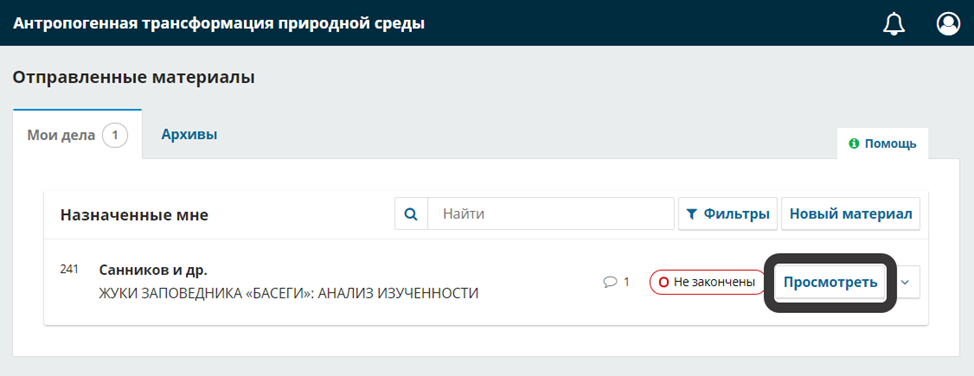
После этого вы сможете вернуться к отправке материалов.
7. РЕДАКЦИОННЫЙ ПРОЦЕСС
Подробно все особенности редакционного процесса описаны в разделе Положение о рецензировании. В общем виде редакционный процесс выглядит следующим образом:
Редакция после получения рукописи проводит её первичную проверку на предмет соответствия требованиям к подаваемым материалам. Проверка проводится в течение 7 дней. После этого Редакция сообщает автору о принятии статьи к рецензированию или о её отклонении.
Далее рукопись поступает к рецензентам. Рецензия должна быть подготовлена в течении 28 календарных дней. В рецензии в обязательном порядке выносится одно из следующих решений:
- рекомендовать рукопись к публикации в представленном виде (без замечаний);
- рекомендовать к публикации только при условии учета замечаний рецензента;
- отклонить представленную рукопись.
После подготовки рецензия поступает в Редакцию, которая направляет её автору для ознакомления. В случае если рецензия предполагает корректировку присланных материалов Автору (Соавторам) необходимо в срок не более 2 месяцев доработать статью.
Доработанная автором статья направляется на повторное рецензирование.
Редакция проводит не более двух раундов рецензирования для каждой рукописи.
После принятия статьи к публикации автор получает об этом соответствующее уведомление. В дальнейшем, выпускающим редактором, ответственным секретарем или другими сотрудниками редакции с автором ведется работа по согласованию конечного макета статьи в номере Журнала.